EnterpriseLMS
The ONLY xAPI v2.0 / cmi5 compliant WordPress based LMS
Designed to be extremely flexible, packed with advanced and premium features, native to WordPress, very lightweight, and easy to use.
EnterpriseLMS transforms WordPress into an enterprise-grade LMS – deliver, sell, and manage every form of training while capturing rich, standards-based learning data you can trust and report on.
Try it risk-free for 14 days!
About EnterpriseLMS
EnterpriseLMS is a WordPress-native learning platform built for organizations that need more than a course catalog.
It delivers online, webinar, and in-person training in one place – backed by a built-in xAPI 2.0 / cmi5 conformant LRS, advanced reporting, learning pathways, memberships, and eCommerce – so you can sell courses, train employees, sell to individuals, and prove outcomes from a single system.
From native quizzes and H5P content to uploaded and remote TinCan/cmi5 packages and instructor-led training with facilities management, EnterpriseLMS turns WordPress into a full enterprise-level LMS: visually manage your organization and your learners pathways, control enrollment and access, drip-release content on your schedule, and capture detailed learner activity you can actually report on.
What is xAPI V2.0 and cmi5?
xAPI v2.0 (Experience API) is the open standard for recording learning activity as simple, shareable statements: who did what, on what content, with what result.
Instead of locking data inside one LMS, xAPI lets any system—courses, quizzes, simulations, mobile apps—send activity to a Learning Record Store (LRS), where it can be stored, queried, and reported on across your entire learning ecosystem.
cmi5 is the industry profile that builds on xAPI to define how an LMS should launch content, manage learner sessions, and track completion.
It standardizes launch data, a defined set of verbs (launched, completed, passed, etc.), and rules for when learners can move on – so packaged e-learning content works consistently across compliant platforms.
Together, they give you interoperability without guesswork:Â xAPI provides the flexible data layer; cmi5 adds the launch-and-completion rules enterprises expect from SCORM-era workflows, with modern, analytics-ready tracking.
Learning Templates is proud to have been one of the original authors of both the xAPI and cmi5 specifications; helping learners learn anywhere and everywhere.
xAPI Authors: https://github.com/adlnet/xAPI-Spec/blob/master/CONTRIBUTING.md
cmi5 Authors: https://github.com/AICC/CMI-5_Spec_Current/blob/quartz/cmi5_spec.md#contributors
Our 10,000 foot list of features you'll find in EnterpriseLMS
All Users Dashboards
-
Course view
-
Dashboard Builder
-
eCommerce enabled dynamic display
-
Detailed Quiz result (links to Quiz)
-
Dynamic Dashboard views
-
Organisational enrollments supported
Course Developers
-
Learning Pathways
-
7 Learning Object post-types
-
Advanced Video integrations, reporting, and progression
-
Category filters
-
Tag filters
-
visibility rules blocks
-
Custom Notifications and messages
-
Powerful, yet simple to use Certificate builder
-
Visual curriculum builder
-
Visual 2 page certificate builder
-
Students can share certificates over social networks
-
Create mixed-mode, and custom pathway rules
-
Students can enroll into curriculums and / or pathways
-
Events (online and in-person) recorded in LRS
-
Visual Curriculum Builder
-
18 question-types / LaTeX included
-
Upload xAPI/cmi5 projects
-
Securely run xAPI/cmi5 projects from remotes servers
-
47 User management, local and remote xAPI/cmi5 content, content control, and content reporting blocks
-
Configurable detailed Quiz Results immediate feedback
-
Forms builder
-
Custom fields builder - supported everywhere - including reports
-
Create different registration forms per curriculum or Pathway
-
Custom Dashboard builder
-
Front-end Users, Course assignment, and Reports Management
-
Built-in Hierarchical, Organizational Management
-
Built-in Online and Live meeting integration
Shop Management
-
PayPal and Stripe integrations (more to come)
-
Create Products and Memberships
-
Tier-level products (curriculums and pathways)
-
Voucher Codes
-
One-time, subscription, and invoice payment types
-
Intuitive purchasing workflow
Administrators
-
Designed for speed with minimal page load sizes
-
Enable / Disable components
-
Advanced reporting and data management
-
Secure Whitelisting of remote elearning content domains
-
Visual user and organisation management
-
Lightweight, uses minimal server resources
-
Fully translatable - Even the downloadable Guides translate
-
Detailed online and printable documentation
-
Onboarding Setup Wizard
-
Advanced Video Reporting
-
built-in ReCAPTCHA (Google, Cloudflare, and hCaptcha)
-
100% WordPress, xAPI, and cmi5 compliant
-
Built in publicly available xAPI and cmi5 Test facilities
-
White Label your site and printable docs
The lists above are far from an extensive list at this time.
EnterpriseLMS has far more features than listed above.
Works With...
Here's what our customers and partners are saying
- No reviews yet.
Watch the videos in this playlist to see it in action!
Is this system secure?
Your built-in LRS uses OAuth-based API Connections and you can secure it with your own key and secret codes. You can use up to 256 character key/secret codes to secure your LRS.
If you want to run xAPI/cmi5 courses form a remote web site, that product will need to be published with your LRS endpoint, Key, and Secret after to add that domain name to your LRS Whitelist.
Beyond the LRS, you can use reCAPTCHA’s from Google reCAPTCHA V3, Clouflare Turnstile, and hCaptcha and apply it to any form you create.
Beyond the LMS/LRS security, WordPress can be secured using services such as Malcare, CleanTalk, or WordFence.
Advanced Reporting
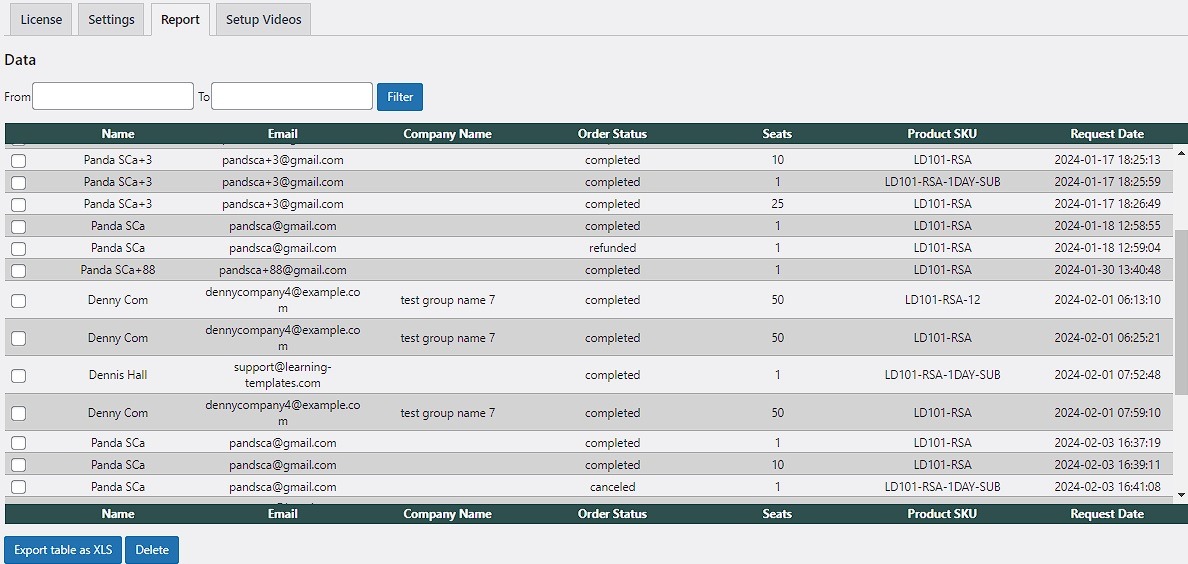
How deep does our reporting go?
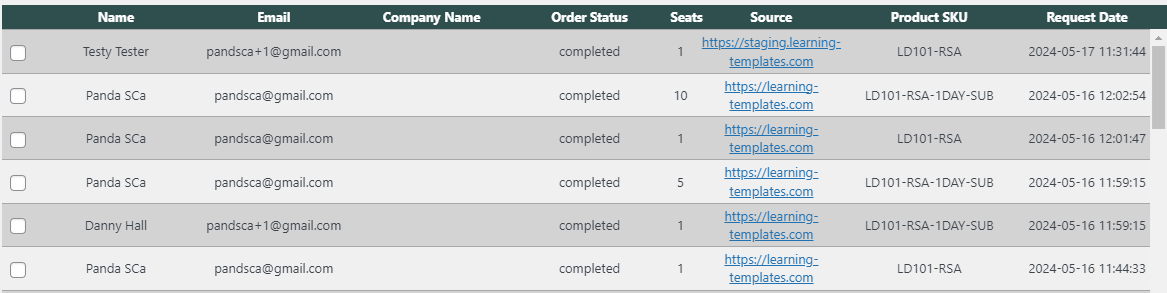
View and manage order statuses from your remote stores.
View and manage order statuses from your remote store.
You can selectively download and/or delete orders
1 LMS Site License + 1 Staging License
- 1 year of email and Zoom support
- 1 year of updates
- 1 year of new features
Frequently Asked Questions
Change Log
Initial public release.
- Fixed Settings → Categories and Tags tabs: resolved browser console errors, 500 errors, and admin notice/DOM issues when adding terms.
- Changed Settings → Categories and Settings → Tags to open the native WordPress edit-tags screen (with return link back to Settings) instead of embedding taxonomy UI inside the tab.
- Renamed the main commerce admin menu from LTLMS Commerce to EnterpriseLMS Commerce.
- Added Enabled Features on Settings → Global Settings: on/off switches to turn major modules on or off site-wide.
- Developer and Users guides now hide sections, block tables, post-type rows, and mixed copy for disabled features; hierarchy examples adapt to enabled levels.
- Users Guide PDF/print cover now uses the site header logo from Appearance → Customize (Site Identity), with plugin default fallback.
- Added guide search above the content column on Developer and Users guides, with match highlighting and Enter to jump to the next match.
- Certificate builder: re-added sample text for dynamic field placeholders and drag-handle labels in preview.
- Certificate builder: added Preview button opening full sample certificate in a new browser tab.
- Quiz Results block now refreshes via AJAX after each question submit without a full page reload.
- Added Actor name filter to xAPI Reports
- Converted many admin settings checkboxes to Select2 controls on Payments, User Dashboard, Roles, quiz metabox, nav menu visibility, commerce products, and related screens.
- Updated Developer and Users guides with feature-flag workflows, settings UI guidance, quiz retake behavior, LRS/login settings, hooks, and go-live checklist items.
Added Setup Wizard.
- Final Beta Release
- Added Predefined Reports to the xAPI Reports builder
- Added Post type filter to xAPI Reports
- Added Quiz cumulative score (xAPI) report column
- Quiz Mark Complete / pathway completion statements now attach the ltlms_cumulative_score context extension when the completed node is a quiz.
- Extended send_learning_statement() to merge optional context.extensions onto outbound xAPI statements.
- Mark Complete on the learning path now redirects to the next learning object when a next URL is returned; otherwise shows the congrats message inline on the page.
- Improved cloze (fill-in-the-gap) answer field sizing using multibyte-safe character counts, wider inputs (up to 48ch), and better min/max width styling.
- Added Question Banks admin tab under EnterpriseLMS → Quizzes/Surveys.
- Question Banks lists every Question block across quiz, course, module, lesson, and topic posts.
- Question Banks support inline pool category and tag editing per row.
- Question Banks bulk actions: add, remove, set, or clear pool categories and tags across selected question blocks.
- Refactored EnterpriseLMS → xAPI/cmi5 Packages admin to a standard WordPress list table with search, sortable columns, and pagination.
- xAPI/cmi5 Packages list table columns: folder, launch URL, entry path, last modified, used in, and actions.
- xAPI/cmi5 Packages views: All, In use, and Unused packages.
- xAPI/cmi5 Packages shows usage links to posts whose block content references each package slug.
- Fixed Tin Can / Articulate Storyline launch URL encoding so actor JSON query parameters are not stripped by esc_url().
- Added admin preview launch URLs for Tin Can packages with LRS endpoint, auth, actor, and activity_id so content is not stuck offline.
- Upload xAPI/cmi5 Package block: choose Upload new ZIP or pick an already-installed package from a dropdown.
- Added contextual block help in the editor (? toolbar button + modal) with links to relevant Users Guide sections for EnterpriseLMS blocks.
- Question block editor: compact Assessment & LRS toolbar (points, Show feedback, Send to LRS) above the configuration fold.
- Added Setup Wizard as a disableable Enabled Features toggle.
- License activation redirect now sends admins to Setup Wizard only when the wizard feature is enabled and not yet completed.
- Added English, German, French, Spanish, and Indian translation catalog, .mo, and JSON Jed chunks.
- Extended wp_set_script_translations() binding for block help and related script handles.
- Developer Guide: new Native xAPI Reports section (builder, predefined layouts, quiz score enrichment, key files).
- Developer Guide: new Translations (i18n) section workflow.
- Users Guide: updated Reports and analytics with predefined layouts, post-type filters, and quiz score vs Quiz Results block guidance.
- Users Guide: added translating EnterpriseLMS steps under Site settings.
- Users Guide: expanded EnterpriseLMS block documentation and xAPI Reports block tips.
- Guides updated for Question Banks, quiz grading reports workflow, Question Details audit rows, and xAPI cumulative score terminology.
- Developer filter ltlms_predefined_report_layouts to customize built-in report layouts.
- Developer filter ltlms_reports_filter_post_type_options to customize Post type choices in Reports.
- Fixed Certificate Preview button.
- Regenerated translations
- Added Confirm password field to Form Builder palette.
- Added Confirm email and Confirm password fields to form builder.
- Form Builder now supports full width and half width (2 columns) layout.
- Custom fields can be dragged from the palette into any position in the form layout.
- Front-end forms dynamically re-bind after AJAX-loaded registration HTML (schedule tree enroll modal and similar contexts).
- Registration forms now show a notice when a signed-in user is already enrolled in the curriculum instead of rendering the form again.
- Registration forms show appropriate notices for signed-in users who are not yet enrolled.
- EnterpriseLMS Form block and registration shortcode auto-detect curriculum and pathway context on singular pathway and curriculum pages.
- Added ltlms_post_has_form_block() helper to detect EnterpriseLMS Form blocks in post content (including student content).
- WordPress featured images on curriculums, pathways, courses, and other enabled LMS post types now display above singular content.
- Curriculum Catalogue block gained a Show featured image setting (default on) with optional placeholder when no image is set.
- Shop block gained a Show featured image setting for product cards.
- My Account → My Courses cards now show featured image thumbnails with a default placeholder fallback.
- Course grid and catalogue templates updated to use shared featured image helpers.
- Curriculum Pathway Tree block opens enrollment in a registration modal with the assigned Form Builder form loaded via AJAX.
- When a paid commerce product is linked to a curriculum or pathway, tree Enroll redirects visitors to the product page instead of the modal.
- Enrolled learners see a branch-filtered pathway tree showing only their chosen subtree when branch choices exist.
- Additional pathway roots still show Enroll for enrolled learners until that track has been started.
- Tree nodes expose product URLs and contextual enroll visibility based on enrollment and pathway root state.
- Schedule tree front-end JavaScript rewritten for modal form loading, page form binding, and product URL enrollment flow.
- Learners choose a track at pathway branch points via prompts in the Learning Post Footer and Course Path.
- Added helpers to resolve the learner’s active path, detect pending branch choices, and render branch-choice markup.
- Pathway builder resolves duplicate content rows across branches using enrollment-aware row lookup.
- Course Path and learning navigation respect stored branch choices when building outlines and adjacent links.
- Learning Post Footer can append branch choice prompts before prev/next/mark-complete controls.
- Commerce products can be scoped to a single pathway within a curriculum (optional pathway selector on the product edit screen).
- Checkout can allow guest checkout with name and email; a WordPress account is created automatically and enrollment runs when the order completes (configurable under Payments → General).
- Guest checkout shows a clear message when an account with the submitted email already exists.
- Commerce enrollment passes pathway root context from product and line items for pathway-scoped purchases.
- Organization seats tab on My Account is now shown only to organization seat managers (users with subordinates who can assign seats), not only organization pool owners.
- Single-seat org purchases can auto-assign the seat to the purchaser on checkout completion.
- Added helper to detect active curriculum seat assignments from org seat pools.
- My Account → My Courses shows a Completed button when every pathway in a curriculum is finished.
- My Courses cards include featured image thumbnails and continue links that respect curriculum resume logic.
- Curriculum-wide completion checks now account for branch choices and pending branch points.
- Certificate and congrats eligibility use branch-scoped pathway completion logic.
- Passing a quiz can automatically mark the corresponding pathway node complete when appropriate.
- Certificate builder gained an Preview button that opens a full sample certificate in a new browser tab.
- cmi5 sample AU can be served via admin-ajax for Settings, Setup Wizard, and block editor contexts (fixes environments where rewrite-based sample URLs fail).
- Added rewrite route and permission checks for the bundled cmi5 sample AU launcher.
- Added shared block editor form layout CSS for in-block configuration UIs.
- Updated Developer and Users Guides.
- Fixed custom field save and reorder in the Form Builder palette.
- Added optional help hints on form fields (accessible hint text on the front end).
- Form Builder admin and front-end styling updates for hint display.
- Improved email verification flow (URL building, merge tags, verification page handling).
- Added autologin token support after registration verification.
- Clearer login error messaging for registration/login flows.
- Registration field rendering and save improvements for curriculum-specific fields.
- New Award Certificate metaboxes on curriculum and pathway posts (enable award, pick template, choose pages).
- Certificates can be issued on pathway/curriculum completion.
- Quiz certificates can be awarded on pass after quiz completion (eligibility logic updates).
- Fixed global certificate target save in certificate admin.
- Fixed All Columns predefined report layout.
- Column picker now stays in sync with the active columns list in the report builder.
- Minor schedule tree and feature-flag wiring updates.
- Translation template sync.
- New Video Lesson block behind the Video Lessons feature flag.
- Video sources: Media Library, external URL/CDN (MP4, WebM, HLS .m3u8), YouTube, and Vimeo.
- Resume playback (last position or furthest point modes).
- Replay button below the player (works across HTML5, YouTube, and Vimeo).
- Completion gating — optional requirement to watch a threshold (default 90%) before Mark Complete is enabled.
- Completion actions:Â enable Mark Complete only, or auto-complete the lesson node.
- Seek-forward control — optional lock to prevent skipping ahead (Replay still allowed).
- Progress persistence in new table (segments, position, completion per enrollment/block).
- xAPI Video Profile statements (initialized, played, paused, seeked, terminated, completed) via REST.
- Optional LRS state sync for resume position.
- Page-level progress: Mark Complete hidden until all required videos on the page are complete.
- Verb scope columns (rscope_*) — verbs chosen from Columns/Verbs become dedicated table columns instead of only setting the Verb filter.
- Labels distinguish families: (xAPI), (cmi5), (cmi5/xAPI).
- Video reporting columns:Â Video title, Video position, Video length.
- Video verb scope columns show playback position (from Video Profile time extension), not wall-clock timestamp.
- Predefined Video report — timestamp, actor, played/paused/seeked/terminated/completed scopes, video title.
- All Columns predefined report expanded with all video columns, voided, and xAPI/cmi5 verb scope columns (aligned with saved admin layout).
- Video verbs excluded from Verb filter dropdown; use scope columns instead.
- Report builder JS/CSS updates for scope chips and column handling.
- Fixed page 1/2 checkbox toggles in Award Certificate metaboxes on pathway, quiz, and curriculum posts.
- Single-page certificate selections now persist correctly on save.
- Developer and Users guides updated for Video Lesson block, Reports verb scopes, predefined layouts, and What’s new in 1.5.0 sections (plain-language, step-by-step).
- New Videos tab added to Guides page.
What minimal server specs do it need to have to use EnterpriseLMS?
We built and tested EnterpriseLMS on a 4CPU, 4GB RAM, 90GB Storage VPS.
EnterpriseLMS was developed again PHP8.5 and MariaDB10.
WordPress had OP Cache, Redis, and WP_CACHE enabled.
What other plugins do i need to have a fully functional LMS?
EnterpriseLMS only requires you have your web site already able to send emails.
To prepare setting up EnterpriseLMS, ensure your web site already sends emails.
Beyond this, you may have other services, processes, or plugins providing features EnterpriseLMS does not provide, so you can continue to use those with little to no expected conflicts.
I want to migrate to EnterpriseLMS. How can I do this?
EnterpriseLMS currently has no migration path from any other LMS.
Because EnterpriseLMS has such a different architecture to store data in it’s LRS, data can be transferred form another LRS as long as the data is mapped correctly.
It’s also pretty certain that other LRS will not have cmi5 data in it, so you may be missing data after the transfer.
You could install EnterpriseLMS along-side your current LMS and copy/paste content from that into the content areas and blocks EnterpriseLMS provides.
WordPress already provides you the tools to do this, but I have created questions using blocks and this is a radically different approach to all other WordPress-based LMS’s.
EnterpriseLMS provides a facility to import and export full curriculums via CSV, so alternatively, you could Export EnterpriseLMS content, and edit it in the CSV to create new information that you would import into EnterpriseLMS information.
Users can also be imported into EnterpriseLMS via CSV upload.